
How Can I Use AI In My Small Business? (A Practical Guide)
How can AI help your small business? Where to start, which jobs to hand over first, what to keep for yourself, and how to keep client data safe.

Short answer: AI helps a small business most with the repetitive admin. The inbox, invoices, quotes, reports and content. Start with one job you’d happily never do again, set AI up properly for your business once, then add one new job at a time. Keep the work you love for yourself.
This is the exact question I get asked most on the UK council-funded AI programmes I teach on. The founders I mentor there save 10+ hours a week once it’s set up… and none of them started techy. Here’s the order I’d do it in.
Step 1: Pick one tool and set it up properly
You don’t need 40 tools. You need one good AI assistant, set up so it knows your business. I use Claude (here’s my full Claude setup guide for small businesses), and ChatGPT works too.
Spend 20 minutes telling it who you are, what you sell, who your clients are and how you like to write. Most people skip this and then wonder why everything sounds generic. The free 30-minute setup is here, and it’s the one tool I’d give a beginner.
Step 2: Find where your hours go
Before you automate a thing, write down a normal week. For most small business owners it looks something like:
- the inbox (always, ALWAYS the inbox)
- sending and chasing invoices
- quotes and proposals
- timesheets, rotas and payroll prep
- reports and admin docs
- filming, editing and posting content
Put a rough number of hours next to each one. The biggest boring number is where you start. Want to see what it’s costing you in pounds? There’s a free calculator on my AI consultancy page.
Step 3: Hand over one job, start to finish
Pick the job you’d most love to hand off and get AI doing it properly before you touch anything else. A few that work well first:
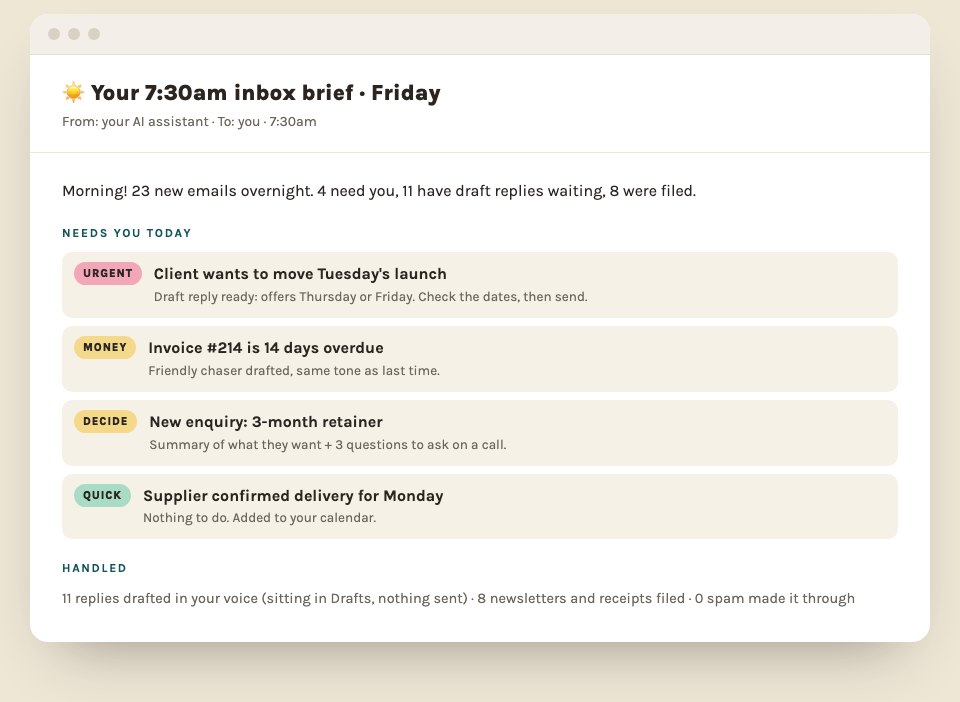
- The inbox. Sorted every morning, replies drafted in your voice, one summary of what still needs you. Copy my 7:30am inbox brief.
- Invoices. Overdue ones spotted, polite reminders drafted.
- Client calls. Notes, actions and the follow-up email ready 4 minutes after you hang up. Here’s how.
- Onboarding. Welcome email, questionnaire and checklist written once, reused for every client. The onboarding pack guide.
- Everything else admin-shaped. 10 prompts that do your admin.
You’ll know it’s working when you stop thinking about that job at all.
Step 4: Connect it to the tools you already use
This is where AI stops being a chat window and starts saving real hours. Claude connects to Gmail, Google Drive, Notion and loads more, so it can read the inbox, find that contract from March, or file your meeting notes in Notion without you copying and pasting a thing.
It can also run on a schedule. That’s what people mean by “AI agent”, and it’s less scary than it sounds.
Step 5: Add one job a week
Once the first one sticks, add the next. A business with a team might go inbox, then timesheets, then invoices, then reports. A coach might go inbox, then onboarding, then content. Here are 12 jobs small businesses are handing over if you want ideas.
The ones who get stuck are the ones trying to automate everything in a single weekend. Yikes.
What NOT to use AI for
- The work you love. Automate the boring bits, never the parts of the job that bring you joy. If you love designing, filming or talking to clients, keep that.
- Anything you haven’t checked. AI drafts. You press send. This 60-second check catches the made-up bits.
- Client data, without rules. Decide what goes in and what never does, before you start. The 5 things to never paste into AI.
Do it yourself, or get help?
You can do every step above on your own with the free guides, and loads of people do. If you’d like it in one tidy weekend, that’s what The Claude Kickstart is.
If you’re the founder AND the admin department, you’ve tried AI before and it didn’t stick, or you’re about to hire someone mainly to keep up… it’s usually faster to have someone build it with you. Here’s when that’s worth it, and here’s what it costs. My own 1:1 AI consultancy is six weeks, fully tailored to your business, and starts with a free 30-minute call.
Either way, pick one job this week.
Quick answers
What's the best way to start using AI in a small business?
Pick one AI tool, set it up with information about your business, then hand over one job start to finish before adding the next. Starting with 10 tools at once is why most people give up.
Which AI tool should a small business use?
Usually the one that fits the tools you already use. Gemini is built into Google Workspace, Copilot into Microsoft 365, and Claude is strong for writing and connecting business tools.
What should small businesses not use AI for?
Final decisions about money, legal matters, hiring, or anything sensitive about clients and staff. Use it to prepare and draft, and keep a human in charge of the decision.