
How To Use Claude For Your Small Business (A UK Setup Guide)
How to set up Claude for your small business in the UK: the Claude for Small Business plugin, what it connects to, and the first workflows to run.

Short answer: teach Claude your business first, install the Claude for Small Business plugin, connect the tools you already use (Gmail, Xero, Google Drive), then run ONE workflow at a time. You sign off on everything before it goes anywhere.
My whole business runs on Claude. My inbox gets sorted 3 times a day, my content planner updates itself twice a day, and I wake up to a brief telling me what needs me. I also teach this to small business owners on UK council-funded AI programmes… so this is the order I’d set it up in, if I was starting from scratch tomorrow.
What “Claude for Small Business” is
Anthropic launched Claude for Small Business in May 2026. It’s a plugin for Claude with ready-to-run workflows for the jobs that come round every single week: a Monday brief, closing the books, proposals, chasing leads and marketing.
The bit UK businesses care about is what it plugs into. Anthropic lists Xero (hello, UK), Intuit QuickBooks (US customers only for now, so UK QuickBooks users can’t connect it yet), Shopify, Stripe, Gusto, Gmail, Google Drive, Docusign, Canva, HubSpot, Apollo.io and Zapier, plus 25 more. Don’t use any of those? The workflows also run from a spreadsheet or a forwarded email.
There’s a short official tutorial on installing the plugin. Prices move about, so check the current plans on claude.com before you pick one (and here’s my take on what’s worth paying for).
Step 1: Teach Claude your business first
This is the step everyone skips. And then they wonder why the answers sound like a press release.
Before you connect a single thing, tell Claude the basics: what you sell, who your clients are, your prices, how you talk and how you like things done. Save it in a Project so every chat starts from there. It takes about 20 minutes and it changes everything after it.
- Your first 30 minutes with Claude walks you through it.
- The 5 settings that make AI yours is the 10-minute version.
- Teach AI to write like you sorts the tone of voice.
Step 2: Connect the tools you already pay for
Start with 2. Yes, only 2.
- Your email (Gmail or Outlook). The inbox is where the hours go.
- Your accounts software. That’s where every money question lives. Xero connects directly. The QuickBooks connector is US-only right now, so if you’re a UK QuickBooks user, export your reports (profit and loss, aged debtors) to a spreadsheet and give Claude that instead.
Add the rest when you’ve got a job for them. Connecting 12 tools on day one is how people get overwhelmed and quietly switch the whole thing off.
Step 3: Run one workflow and watch it
Pick the one that annoys you most. Good first ones:
- A Monday brief: your week, your numbers and what needs you, in one message.
- Invoices and the books: what’s overdue, what’s been paid, what needs a nudge.
- Proposals and quotes: drafted in your format from a few notes or a voice memo.
- Lead follow-ups: new enquiries answered so nobody goes cold.
Every one of these drafts. You check it, you send it. That’s how it should work for anything going out with your name on it.
Step 4: Make it run on its own
Once a workflow works, put it on a schedule. That’s what people mean when they say “AI agent”, and it’s much less scary than it sounds.
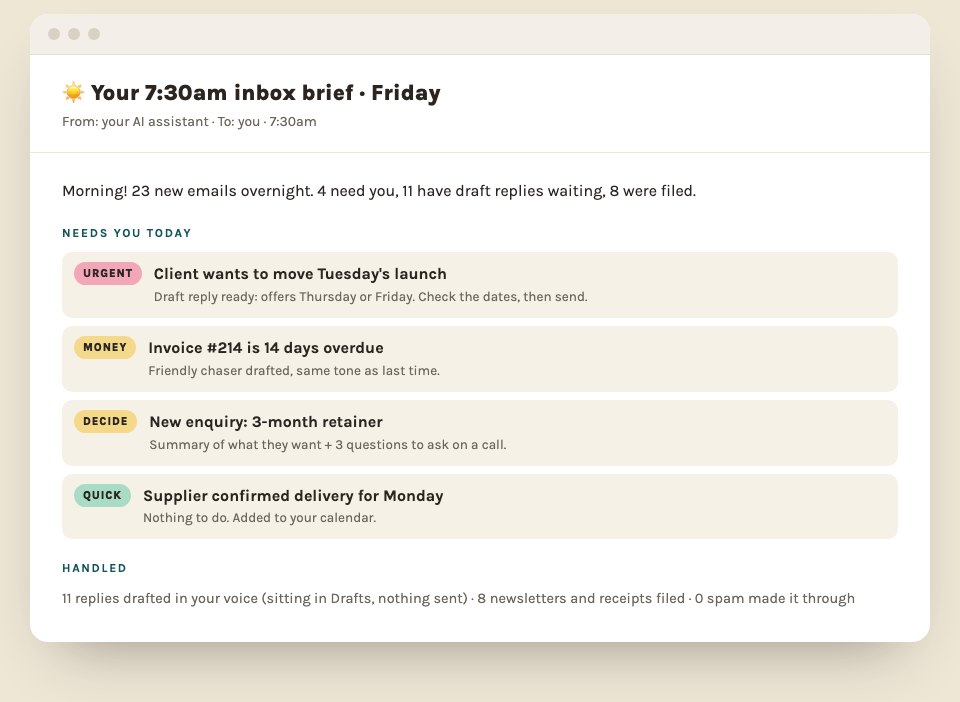
Mine reads my inbox and hands me a brief before I’ve had a coffee. If you want to copy it, here’s the 7:30am inbox brief. If you want Claude to follow your process every time without being told, write your first Claude Skill (no code, 15 minutes).
What to keep human
- The work you love. Automate the boring bits. Never the parts of the job that bring you joy.
- The final send. Claude drafts, you press the button.
- Your client data rules. Decide what Claude can see and what it never touches, in writing, before you connect anything. Start with the 5 things to never paste into AI.
Claude or ChatGPT?
Both are good. I use Claude because the way it connects to business tools, and the way it writes, suits how I work. If your team already lives in ChatGPT, the steps are the same: teach it your business, connect one tool, run one workflow. Not sure which Claude model to use for what? That’s here.
Want it set up properly, with someone next to you?
Most small business owners can get the first workflow going on their own over a weekend. Where people get stuck is the 2nd, 3rd and 4th, and wiring it all round how their business runs.
That’s what my 1:1 AI consultancy is for. Six weeks, fully tailored to your business, with Claude built into your inbox, your clients, your team and your admin. It starts with a free 30-minute call.
More reading if you’re not there yet: how can AI help my small business? and 12 jobs to automate first.
Quick answers
Is Claude good for small businesses?
Yes. It's strong at writing in your voice, handling documents and connecting to business tools like Gmail, Google Drive, Xero and Shopify. I run my whole business on it.
How much does Claude cost for a small business?
There's a free plan, but for business use you'll want a paid plan. Claude Pro is around £20 a month, and Team plans are available if several people need it.
Does the Claude QuickBooks connector work in the UK?
Not yet. The QuickBooks connector is currently limited to US customers. UK businesses can connect Xero, or export QuickBooks reports to a spreadsheet and give Claude that.