
How To Automate Your Small Business With AI: 12 Jobs To Hand Over
How to automate your small business with AI: 12 admin tasks UK businesses are handing over, from inbox and invoices to timesheets, quotes and reports.

Short answer: automate anything repetitive, text-heavy and rule-based first. Email triage, invoice chasing, timesheets, quotes, meeting notes, reports and repurposing content are the big ones. The founders I mentor on UK council-funded AI programmes save 10+ hours a week once a few of these are wired in.
I spent 6+ years building booking systems, onboarding workflows and enquiry management for other people’s businesses before AI turned up. So when I say “automate”, I mean properly: set up once, running without you. Here are 12, grouped by where the hours go.
Inbox and admin
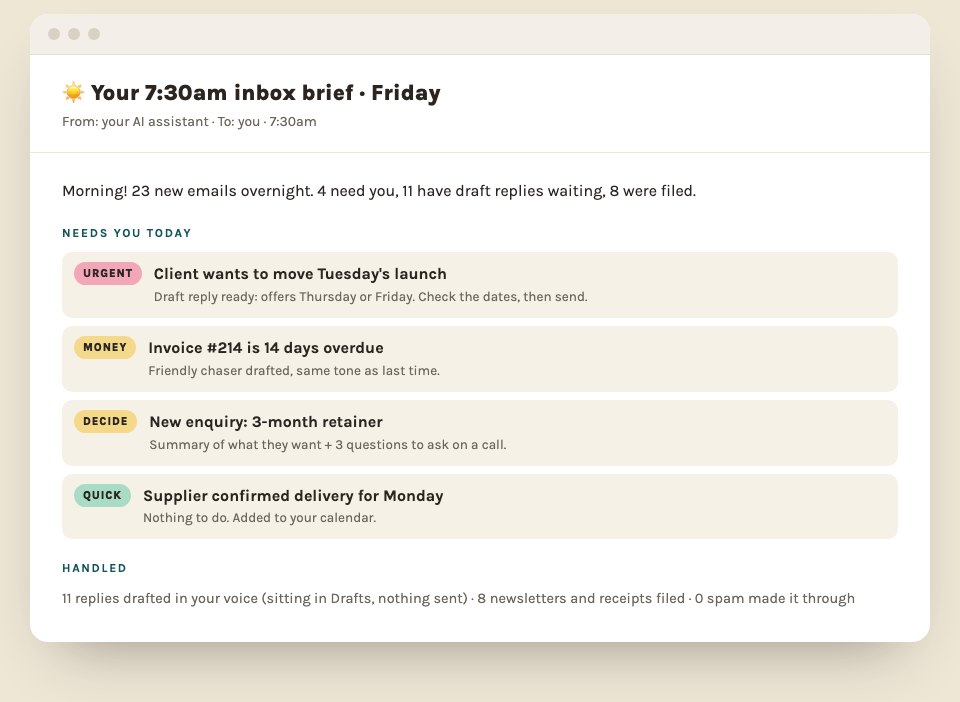
1. Inbox triage with a daily to-do email. AI reads the inbox, sorts it by priority, drafts replies in your voice and sends you one summary each morning of whatever’s still waiting on you. You still press send on everything. Copy the 7:30am inbox brief.
2. Meeting notes that file themselves. Calls recorded, summarised, saved to the right client, actions pulled out, follow-up drafted. Turn client calls into actions, or have it all land in Notion.
3. Training videos and webinars into notes. That 90-minute CPD session becomes one page you’ll read.
Team and operations
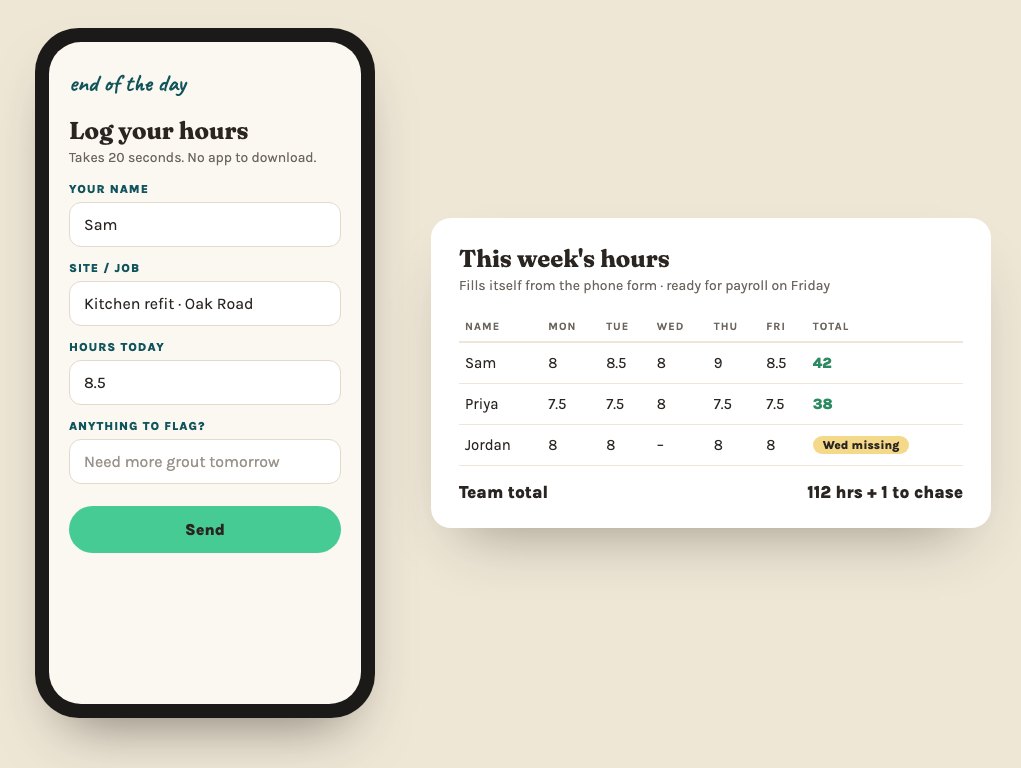
4. Timesheets that get filled in. A charity I’m mentoring had staff timesheets in a spreadsheet nobody filled in properly (sound familiar?). We’re building a simple form the team fills in on their phones, feeding a live dashboard.
5. SOPs and handovers. Talk through how a job’s done and get a step-by-step your team can follow. The quickest way to get the business out of your head.
6. Supplier and stock updates. The right people told automatically when stock’s low or an order needs chasing.
Clients and money
7. Enquiry to onboarded. Enquiry answered, call booked, welcome pack and contract sent. I’ve been building onboarding systems for founders for years, and a slick one is the first thing clients notice. Build your onboarding pack in an hour.
8. Quotes and proposals from a voice note. Talk the job through on the drive back from site and a draft quote is waiting in your format. Want a quote tool clients can use themselves? Build a price calculator in 10 minutes.
9. Invoices chased on time. Overdue invoices spotted and polite reminders drafted, so the money lands before month-end. Plus 10 prompts for the rest of your admin.
Content and marketing
10. A workspace that knows your business. Your services, tone and past work loaded in once, so every draft already sounds like you. Teach AI to write like you.
11. One piece of content, every platform. A leaflet, voice note or blog turned into posts, captions and an email. The filming and the creative bit stay yours. One voice note, a month of posts.
12. Reports that write themselves. Numbers pulled from your tools into a monthly report, commentary drafted for you to check.
What NOT to hand to AI
The work you love. The rule I use with every single business: automate the boring bits, never the parts of the job that bring you joy. And never paste client data into an AI tool without agreeing what’s allowed first (the 5 things to never paste in).
Where to start
Pick the one job you’d most love to hand off. For most people it’s the inbox or invoices, because they’re daily and you feel the difference by the end of week 1. If you’re on Claude, here’s how to set it up for a small business. Brand new to all of it? Start with how can AI help my small business?
Want to know what your admin is costing you first? There’s a free calculator on my AI consultancy page. And if you want these built into your business with me beside you, that’s what the six weeks are for.
Quick answers
What admin tasks can AI do for a small business?
Inbox triage and reply drafts, invoice chasing, meeting notes and follow-ups, reports, quotes and proposals, rotas and timesheets, and turning one piece of content into posts for every platform. The best first job is the one you do every day and dread.
Is it safe to let AI send emails for my business?
Start with AI drafting and you pressing send. Once you trust the drafts for a specific type of email, you can let it handle that one type. Never hand over anything with money, legal or sensitive client details without a human checking.
How much time can automating admin with AI save?
It depends on how much admin you do now. The founders I mentor on UK council-funded AI programmes save 10+ hours a week once a few jobs are handed over properly.