
How To Do An SEO And AI Visibility Audit With Claude
How to audit your website's SEO and AI visibility with Claude: check indexing, find what people search, fix titles, add schema, and get cited by AI tools.
Short answer: an SEO and AI visibility audit with Claude has 5 parts: check Google can see your pages, find what people search for, fix your page titles to match, add the behind-the-scenes info AI tools read (schema and llms.txt), and write pages that answer real questions. I did this on my own site this week, so here’s exactly what I found.
The shock: Google could see 3 of my 65 pages
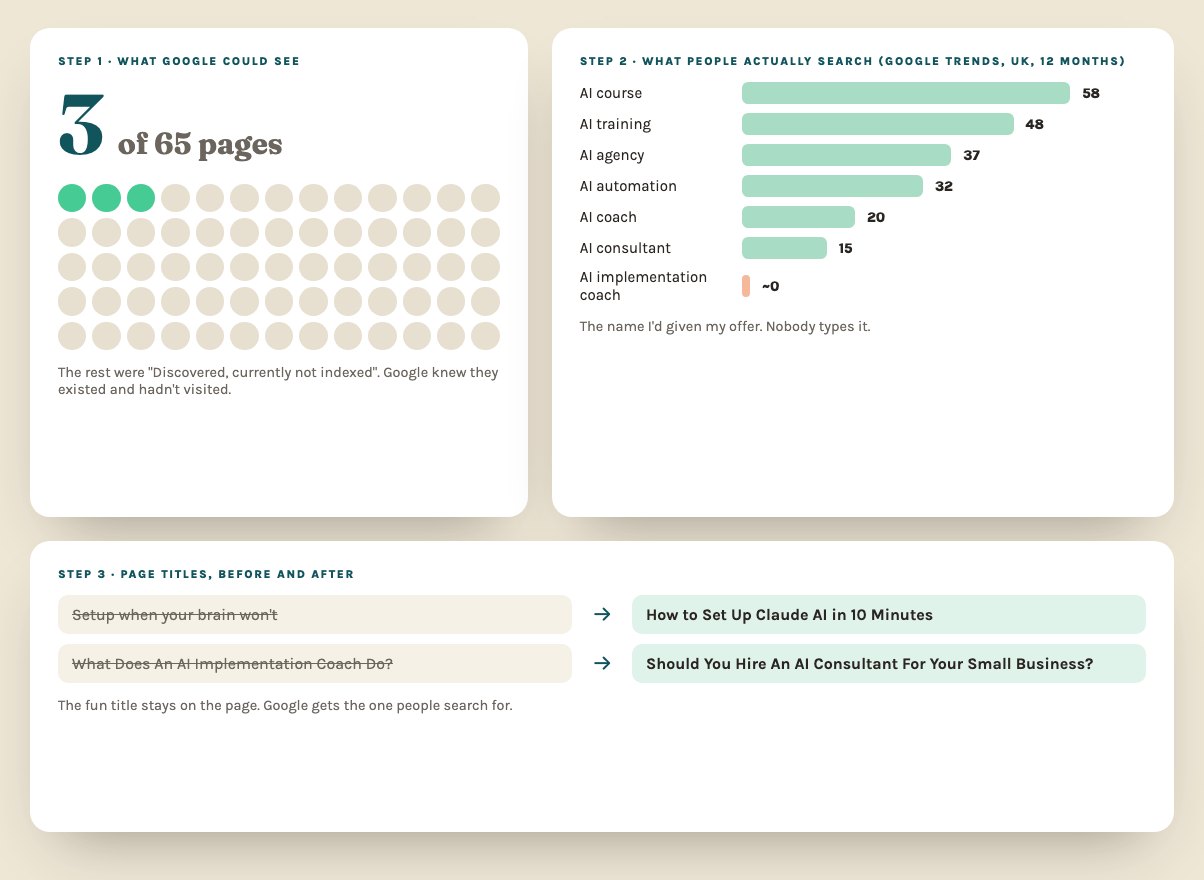
The first thing Claude checked was Google Search Console. Only 3 of my 65 pages were in Google. The rest were “discovered, currently not indexed”, which means Google knew they existed and hadn’t bothered visiting yet. Yikes.
No amount of clever content helps if Google isn’t looking. So start there.
Step 1: Check what Google can see
In Search Console, look at the Pages report. Then use URL Inspection on your most important pages and request indexing (you get about 10 a day). Also check your site doesn’t answer on 2 addresses (www and non-www). Mine did, which split everything in two. Claude spotted it and fixed it with a redirect.
Step 2: Find what people search for
I assumed people search for “AI implementation coach”. Nobody does. Claude pulled hundreds of real UK Google autocomplete suggestions and compared terms in Google Trends. The winners for me were things like “how to use Claude for small business” and “how can AI help my small business”.
Ask Claude to do the same for your business: give it 20 starting phrases and ask what people type after them.
Step 3: Fix your page titles
My guide titles were written for Instagram (“Setup when your brain won’t”). Great hook, zero searches. Claude gave each page a separate search title for Google, like “How to Set Up Claude AI in 10 Minutes”, while the fun title stays on the page.
Step 4: Speak AI’s language
AI tools like ChatGPT and Perplexity read hidden info on your site to understand who you are. Claude added:
- Schema: a hidden label saying what your business is, who runs it and what you sell
- FAQ schema on your sales page, so AI can quote your answers
- llms.txt: a plain summary of your site written for AI tools
Step 5: Answer the questions people ask
The blog you’re reading came out of this audit. Each post answers one real search, starts with a short answer (AI tools quote those), and links to related pages. How to use Claude for small business was the biggest gap I found.
What Claude can’t do for you
Get other websites to mention you. Links from other sites, reviews and being talked about in places like Reddit still matter most, and that bit takes time. Here’s what outside help costs if you’d rather hand it over.
Want this done for your business with me? It’s one of the things my 1:1 AI consultancy covers. Or start with how can AI help my small business?
Quick answers
Can Claude do an SEO audit?
It can do most of the work: review your page titles and descriptions, find gaps, suggest what to write, and add the structured data AI search tools read. You still need Google Search Console to see what Google has actually indexed.
What is AI visibility?
Whether tools like ChatGPT, Claude and Google's AI answers mention your business when someone asks a question you should be the answer to. Clear pages, FAQs and structured data all help.
How do I check which of my pages Google has indexed?
In Google Search Console, open the Pages report. It lists which pages are indexed and why the rest aren't. You can request indexing for important pages from the URL Inspection tool.