
How To Use AI For Your Ecommerce Business (A Real Small Shop Example)
How to use AI for an ecommerce business: customer service emails, Shopify admin and marketing, with a real UK small shop example and where to start.

Short answer: the best way to use AI for a small ecommerce business is customer service emails first, then order admin and marketing. The quickest win is usually a daily inbox summary with replies already drafted. The trick is keeping it simple, which sometimes means NOT buying another tool.
This one’s from a business I supported on a UK council-funded AI programme. A family-run online shop, 13 years old, run by a mum and daughter. Details anonymised.
The problem
2 inboxes (an old one from when the business started, and the newer one from the website), 2 people, and customer emails landing everywhere. Things got missed. Evenings went on replying.
Using AI for ecommerce customer service emails
Every morning Claude reads the inbox, sorts what needs a reply, drafts the replies, and flags anything still waiting. I suggested sending the summary as an email instead of leaving it in a chat thread, so it doubles as the to-do list for both of them.
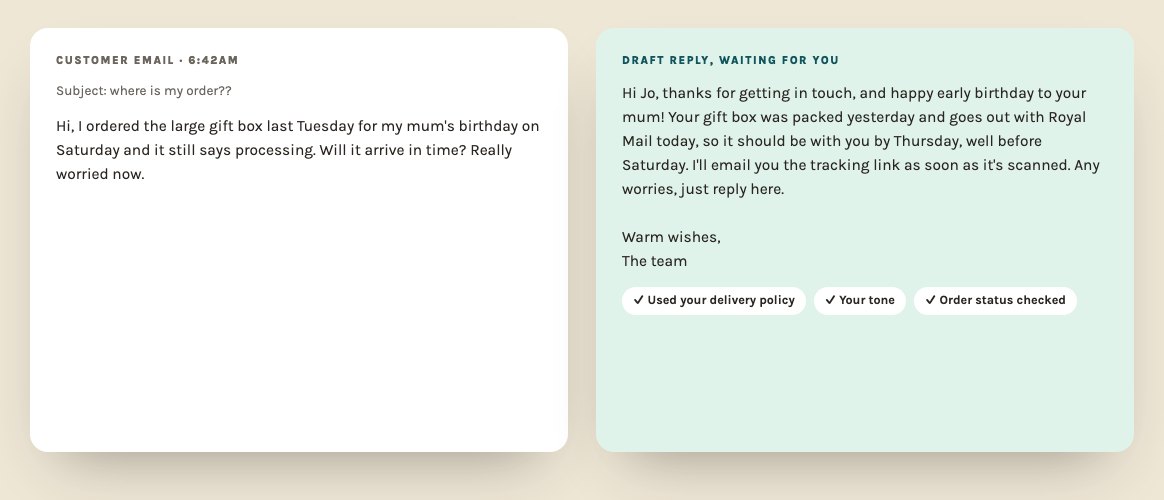
The bit I liked most: they cancelled a tool
They’d been advised to pay for an extra automation platform to connect the old inbox. For what they needed, it was overbuilt. An auto-reply on the old address pointing customers to the main one did the same job for free, because the main inbox already connects to Claude.
That’s a pattern I see a LOT. People add tools when the fix is simpler. (Six years of untangling other people’s tech stacks will do that to you.)
2 lessons for any ecommerce business
- Build separate workflows for separate jobs. Inbox, social media and Shopify each get their own, so when one breaks the others keep running.
- Edit the latest version. When you want to change an automation, talk to its most recent run, not the original chat from weeks ago. The recent one has all the fixes in it.
AI for your Shopify store (and other ecommerce admin)
- Order and delivery questions answered from your policies
- Product descriptions and emails drafted from your notes
- Stock and supplier updates sent to the right people
- One product launch turned into posts for every platform (here’s how)
If you run on Shopify, Claude’s small business plugin connects to it: my Claude setup guide. For the full list, see 12 jobs to automate first. And if you want it built around your shop with me beside you, that’s my 1:1 AI consultancy.
Quick answers
How can AI help an online shop?
Customer service emails, product descriptions, order and stock updates, supplier emails, and a daily summary of what needs doing. It frees the owner up for products and marketing.
Can AI answer ecommerce customer service emails?
It can sort them by priority and draft replies in your voice, using your policies for delivery, returns and refunds. Keep a human pressing send, at least at first.
Does Claude connect to Shopify?
Yes, Shopify is one of the connectors listed for Claude for Small Business, so Claude can work with your store data once it's connected.