
AI For Coaches And Consultants: What To Hand Over First
How coaches and consultants can use AI for client emails, session prep, onboarding and content, without losing the human part clients pay for.

Short answer: coaches and consultants should hand AI the work around sessions, never the sessions. Client emails, prep, notes, onboarding and turning what you know into content. Your clients pay for you. They don’t pay for you to spend Sunday formatting a welcome pack.
Real example: a coach drowning in admin
A coach I’m mentoring on a UK council-funded AI programme came in with one goal: get the repetitive admin out of her practice. We worked on 3 areas:
- Client comms. Follow-ups and check-ins drafted in her voice, for her to send.
- Meeting prep. Notes from the last session pulled together before the next one.
- Content. One idea turned into posts across her platforms, so she’s not starting from blank every week.
I also gave her 2 of my own Claude skills: one that stops AI writing sounding like AI, and one for making short videos. Skills are saved instructions Claude follows every time. Here’s how to write your first one.
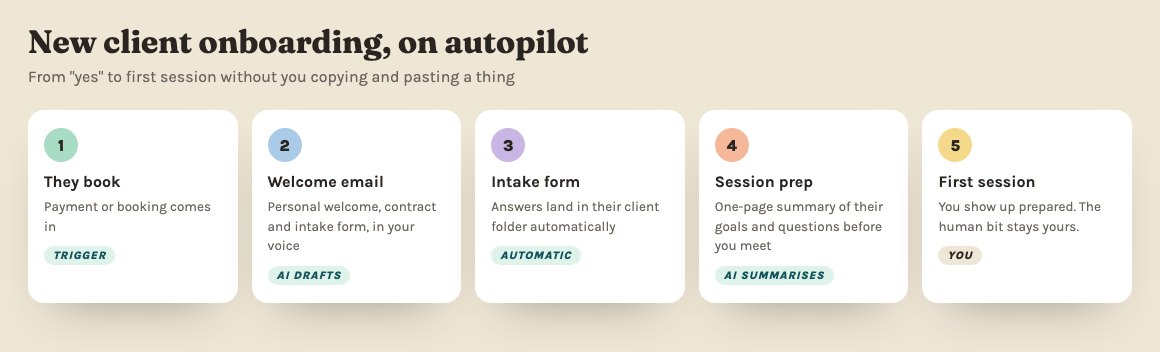
The one I’ve built most: client onboarding
Before AI, I spent years building onboarding systems for coaches and consultants. Here’s what two of them said on LinkedIn:
“My onboarding process is now so slick - it’s actually one of the top reasons clients sign up with me! I’ve got back 3+ hours per week.” (Naida Allen, Transformational Coach)
“Now I have a streamlined, smart and professional onboarding process that saves me 3-5 hours a week.” (Georgia Dixon, Founder, Access HR)
With AI, that same system is faster to build. Welcome email, questionnaire, contract and kickoff checklist, written once from how you work. The onboarding pack guide walks you through it.
A word on client data
Coaching notes are personal. Decide, in writing, what goes into AI and what never does, and tell clients how you use it. Using AI in client work without making it weird and the 5 things to never paste in are the place to start.
Where to start
Client calls are the easiest win: notes, actions and the follow-up email ready minutes after you hang up. Turn every client call into actions. Then onboarding. Then content.
Want it built into your practice properly? My 1:1 AI consultancy is six weeks, fully tailored, starting with a free call. New to all of this? Start with how can AI help my small business?
Quick answers
How can coaches use AI in their business?
For everything around the coaching: client onboarding, session notes and follow-ups, scheduling, proposals, and content drafted from your own voice notes. The sessions themselves stay human.
Is it OK to put coaching client information into AI?
Only with care. Use a paid business plan, check the data settings, keep sensitive client details out unless you need them, and tell clients how you use AI. If in doubt, anonymise it first.
What should a coach automate first?
Client onboarding. Welcome email, contract, intake form and first-session prep happen for every client, so it's the job where AI saves time from week one.